
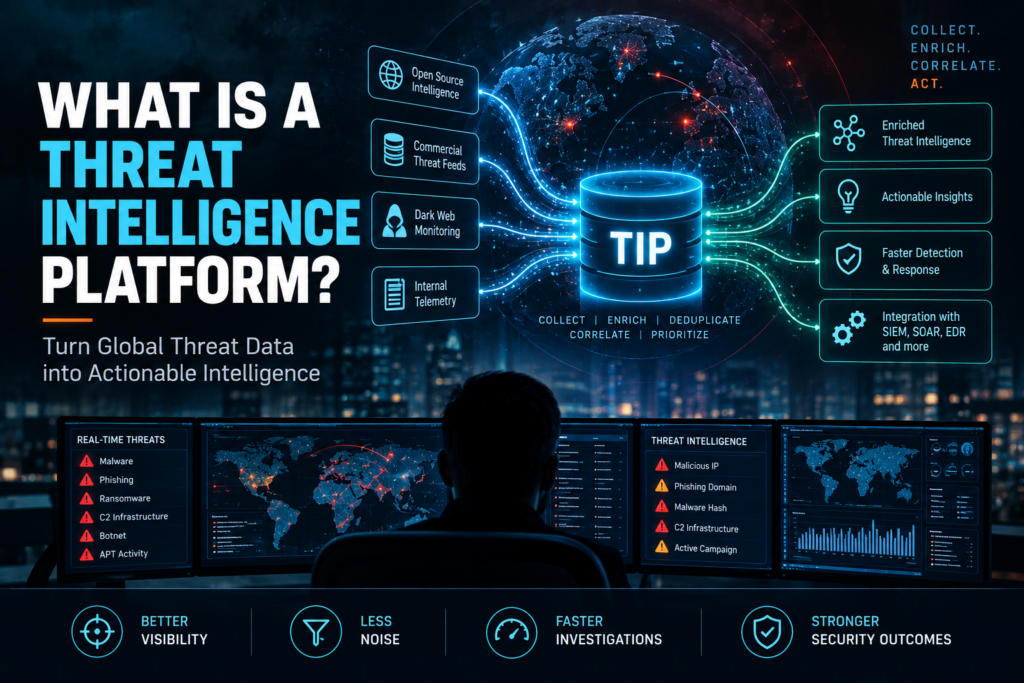
A no-jargon guide to what a TIP does, why it exists as a separate category, and how to tell whether you need one.
Your SIEM ingests logs. Your EDR watches endpoints. Your firewall blocks traffic. Somewhere in between, threat intelligence exists — feeds of malicious IPs, domains, hashes, and adversary profiles that are supposed to help you detect and respond to threats faster. The problem is that without a system to manage, correlate, and operationalize that intelligence, it sits in a spreadsheet or an email inbox and helps nobody.
A Threat Intelligence Platform is the system that turns raw threat data into something your SOC can actually use.
What a TIP Actually Does
- Aggregates feeds. A TIP ingests threat intelligence from multiple sources: commercial feeds (Recorded Future, Mandiant), open-source feeds (AlienVault OTX, Abuse.ch), ISACs, government advisories, and your own internal threat research. It normalizes everything into a common format — typically STIX/TAXII — so you can query across sources without dealing with format differences.
- Deduplicates and correlates. The same malicious IP will appear in six different feeds with different confidence scores and different context. The TIP deduplicates, merges the metadata, and assigns a composite confidence score. One IOC record instead of six.
- Enriches with context. A hash is just a string without context. The TIP connects it to the malware family it belongs to, the adversary group that uses it, the MITRE ATT&CK; techniques it maps to, and the campaigns it has been observed in. This context is what turns an indicator into intelligence.
- Pushes to enforcement points. The TIP sends confirmed malicious indicators to your firewall, proxy, EDR, and SIEM — automatically. When a new C2 domain is identified, it appears in your block list within minutes, not after an analyst manually copies it from an email.
- Tracks adversaries. Beyond individual IOCs, the TIP maintains profiles of threat actors, their TTPs, their targeting patterns, and their infrastructure. This is how you move from reactive blocking to proactive hunting.
TIP vs SIEM vs SOAR: Where the Boundaries Are
The confusion is understandable because all three touch threat data. Here is the distinction: the SIEM detects threats by correlating logs and alerts. The TIP tells you what to look for by managing the intelligence that feeds detection rules. The SOAR acts on what was detected by orchestrating the response. The TIP sits upstream of both — it is the knowledge layer that makes detection smarter and response faster.
In practice, many teams get TIP functionality bundled into their SOAR or SIEM platform. A standalone TIP makes sense when you consume more than two or three threat feeds, when you have a dedicated threat intelligence team, or when regulatory requirements mandate structured intelligence management and sharing.
| The test for whether you need a TIP is simple: are your analysts manually copying IOCs from emails and pasting them into search bars? If yes, you need a TIP — or at minimum, TIP capabilities integrated into your SOC platform. |
What to Look for in 2026
The TIP market has matured. The baseline capabilities are table stakes. Differentiation now comes from:
- Bidirectional integration with SOAR. The TIP should not just feed IOCs to your detection tools. It should receive case outcomes back: which IOCs were found in your environment, which led to confirmed incidents, which were false positives. This feedback loop improves the intelligence over time.
- Automated scoring and aging. IOCs have a shelf life. An IP associated with a campaign six months ago may be reassigned to a legitimate hosting provider today. The TIP should age out stale indicators and adjust confidence scores based on recency and corroboration.
- MITRE ATT&CK; mapping. Every IOC and adversary profile should map to ATT&CK; techniques. This is how you connect intelligence to detection coverage: you can see which techniques you have intelligence for but no detection rule, and vice versa.
- Sovereign deployment. For regulated industries, the TIP must run on infrastructure you control. Your threat intelligence — especially internally generated intelligence — is sensitive data. It should not leave your perimeter.
Threat intelligence is only as valuable as your ability to act on it. The TIP is the system that closes the gap between knowing about a threat and being able to detect and respond to it. If that gap exists in your SOC, the platform category does not matter — TIP, integrated SOAR, or unified SecOps. What matters is that the capability exists and is working.
Frequently Asked Questions
1. What is a Threat Intelligence Platform (TIP)?
A Threat Intelligence Platform (TIP) collects threat data from multiple sources, enriches it with context, removes duplicates, and turns raw threat information into actionable intelligence for security teams.
2. How is a Threat Intelligence Platform different from SIEM?
A SIEM analyzes security logs and events to detect threats, while a TIP manages external and internal threat intelligence by enriching indicators and providing context that helps SIEM and SOC teams make better decisions.
3. What’s the difference between a TIP and SOAR?
A TIP focuses on collecting, enriching, and prioritizing threat intelligence. SOAR uses that intelligence to automate investigations and incident response through playbooks and workflows.
4. Why do SOC teams need a Threat Intelligence Platform?
A TIP helps SOC teams reduce manual research, prioritize high-risk threats, enrich alerts automatically, and improve detection and response across their security tools.
5. Can a Threat Intelligence Platform work with AI?
Yes. Modern TIPs can use AI to correlate threat indicators, identify attack patterns, prioritize intelligence, and help analysts investigate threats more efficiently while integrating with SIEM and SOAR platforms.
